
You have invested in the screen, chosen comfortable seating, fine-tuned the sound system, and perhaps added accent lighting, movie posters, or even a fiber-optic star ceiling.
Movie night is ready.
Then, halfway through the film, the room begins to feel warm. The air grows stuffy, the equipment cabinet feels hot to the touch, and everyone starts noticing the temperature rather than the movie.
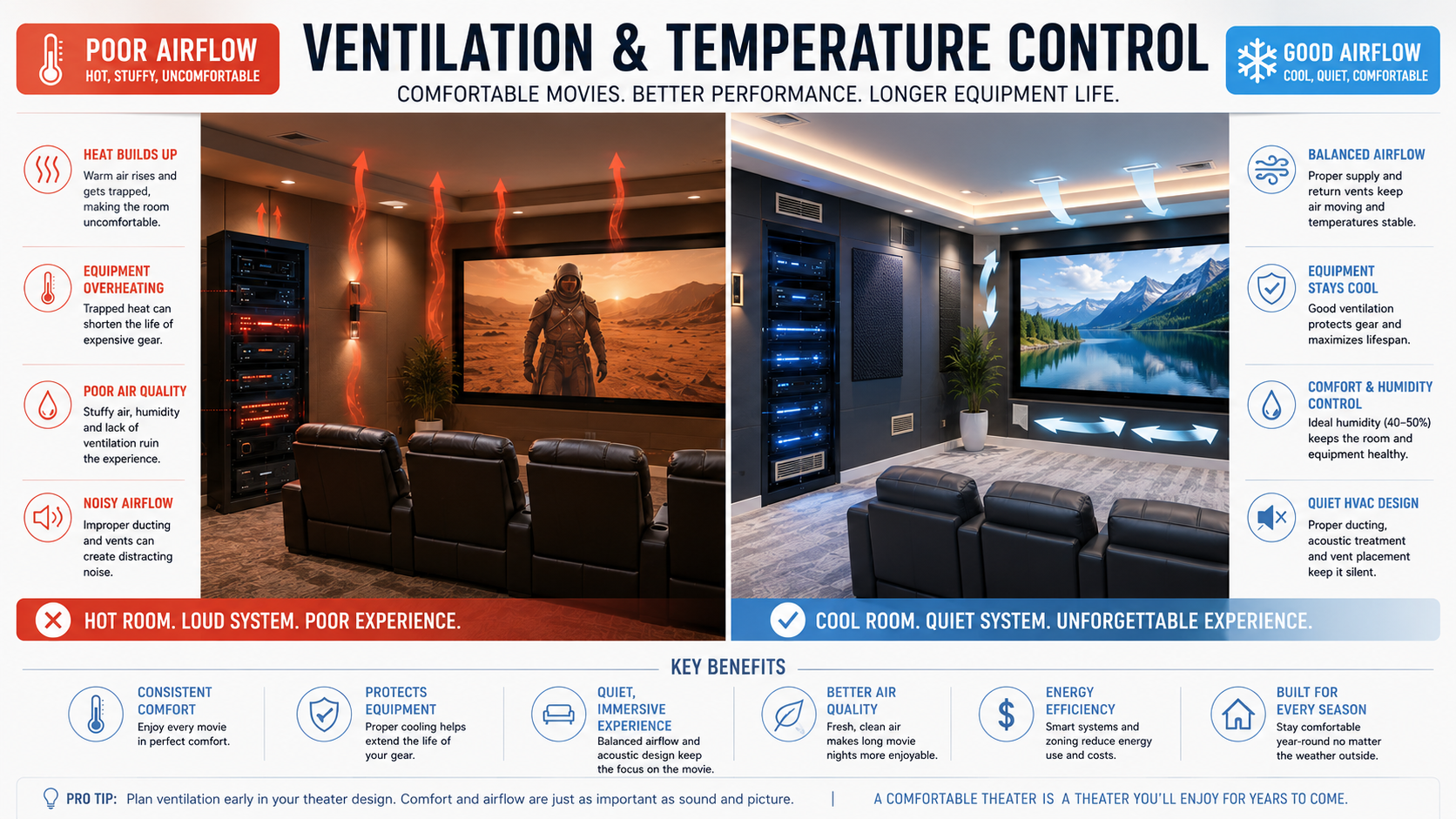
Ventilation and temperature control are easy to overlook when planning a home theater, but they can be just as important as the screen, speakers, and seating. A theater should feel immersive from the opening scene to the final credits, and comfort is a major part of that experience.
Whether you have a dedicated theater room, basement cinema, gaming room, or family entertainment space, proper airflow can help keep the room comfortable while protecting the equipment inside it.
Affiliate disclosure: This post may contain affiliate links. As an Amazon Associate, I earn from qualifying purchases at no extra cost to you.
Quick Guide to Home Theater Ventilation
| Area to Consider | Why It Matters | Practical Solution |
|---|---|---|
| Room temperature | People and electronics can quickly warm an enclosed room | Improve HVAC airflow, add zoning, or consider a mini-split |
| Fresh-air circulation | Closed theater rooms can become stuffy | Make sure the room has both supply air and a return-air path |
| Equipment cabinets | Receivers, amplifiers, and consoles generate heat | Use open shelving, ventilation grilles, or quiet cooling fans |
| Projector airflow | Projectors rely on clear intake and exhaust vents | Leave adequate clearance around the projector |
| HVAC noise | Loud airflow can distract from quiet scenes | Use lower air velocity, insulated ducts, and quiet registers |
| Humidity | Excess moisture can affect comfort and room finishes | Use a humidity monitor or dehumidifier when needed |
| Smart control | The theater may be warmer than the rest of the house | Use room sensors, schedules, and smart temperature controls |
Why Ventilation Matters More Than Most People Realize
Home theaters are designed to contain sound, block outside light, and reduce distractions. Thick carpet, acoustic panels, blackout curtains, upholstered seating, insulated walls, and closed doors all help create the cinematic atmosphere we love.
Unfortunately, many of those same features also trap heat.
Projectors generate heat while operating. Receivers and amplifiers work hard during movies. Gaming consoles may run for hours. Add several people to an enclosed room, and the temperature can rise surprisingly quickly.
Poor airflow may lead to:
- Warm or uneven temperatures
- Stuffy air during longer viewing sessions
- Electronics operating at higher temperatures
- Equipment fans running constantly
- Humidity concerns
- Unexpected equipment shutdowns
- Reduced comfort during movie night
The room may feel perfectly comfortable while it is empty but noticeably different once everyone settles in for a movie marathon.
Identify the Heat Sources in Your Theater
Before choosing a cooling solution, it helps to understand where the heat is coming from.

Receivers, Amplifiers, and Audio Equipment
AV receivers, amplifiers, and processors can produce a significant amount of heat, especially when several components are installed together.
They are often hidden inside attractive cabinets, built-in media walls, or equipment closets. While enclosed storage creates a cleaner appearance, it can also trap warm air around expensive electronics.
Try to provide:
- Clearance above and beside each component
- Open space behind the equipment
- A path for cooler air to enter
- A higher opening where warm air can escape
- Access for cleaning and maintenance
Avoid stacking heat-producing components directly on top of one another unless the manufacturer specifically allows it.
Cable organization also matters. Tangled cords can crowd the back of a cabinet, restrict access, and make it more difficult to keep equipment areas clean. For more ideas, my guide to organizing a home theater covers cables, equipment, storage, seating, and movie-night essentials.
Projectors
Projectors naturally generate heat and rely on internal fans to move air through the housing.
Every projector has intake and exhaust vents, and those areas need adequate clearance. Blocking them with a shelf, wall, enclosure, ceiling trim, or decorative feature may cause the projector to run hotter than intended.
When planning projector placement, consider:
- The manufacturer’s recommended clearance
- The direction of the intake and exhaust airflow
- Distance from walls and ceiling surfaces
- Access for maintenance or filter cleaning
- Whether hot exhaust air is directed toward viewers
- The location of nearby HVAC vents
A projector hush box may help reduce fan noise, but it must be designed with proper ventilation. A sealed decorative box can create more problems than it solves.
If you are still deciding which display is best for your room, my guide comparing a TV vs. projector for a home theater can help you weigh room size, lighting, everyday use, and the type of experience you want.
Gaming Consoles and Streaming Devices
Modern gaming systems are powerful and can produce more heat than many people expect.
Consoles tucked into tight cabinets may struggle to release warm air, especially during long gaming sessions. Leave adequate space around consoles, streaming boxes, media servers, network equipment, and power-management devices.
If gaming is an important part of your theater, airflow should be included in the room plan from the beginning. My guide to creating an immersive home theater gaming setup also covers screen choices, sound, seating, lighting, storage, and gaming accessories.
People, Lighting, and Sunlight
People also add warmth to a room. A theater that feels comfortable for one or two viewers may become noticeably warmer when several guests arrive.
Lighting can add heat as well. LED bulbs generally produce less heat than older incandescent or halogen bulbs, and layered lighting lets you use only the fixtures needed during the movie.
For ideas on combining ambient, accent, safety, and task lighting, visit my guide to layering lighting in a home theater.
In rooms with windows, blackout curtains or shades can help reduce both screen glare and heat from direct sunlight.

Planning HVAC for a Dedicated Theater Room
If you are building or renovating a dedicated home theater, ventilation should be considered early in the design process.
Retrofitting airflow solutions later is possible, but planning before the walls and ceiling are finished usually provides quieter and more attractive options.
For major HVAC changes, consult a qualified HVAC professional who can assess the room size, insulation, equipment load, occupancy, and existing system.
Supply Vents
Supply vents deliver conditioned air into the room.
Placement matters because strong airflow directed at the seating can feel distracting, especially during quiet scenes. It may also create a cold spot while other parts of the room remain warm.
Supply vents often work best when they are:
- Placed around the room’s perimeter
- Positioned away from the main seating area
- Kept clear of curtains and furniture
- Sized to move enough air without creating excessive noise
Return-Air Paths
Conditioned air needs a way to leave the room and return to the HVAC system.
A theater with a supply vent but no effective return path may experience weak circulation, pressure imbalances, or heat buildup when the door is closed.
Depending on the room, the return path might include a dedicated return vent, transfer grille, jumper duct, or another professionally designed solution.
Quiet Operation Matters
A powerful HVAC system loses some of its appeal if it sounds like a wind tunnel during an emotional scene.
Quiet home theater ventilation may involve:
- Larger ducts that move air more slowly
- Oversized or low-velocity registers
- Insulated ductwork
- Acoustic duct lining
- Curved or longer duct paths
- Vibration isolation
- Properly sized equipment
The goal is not simply to move more air. It is to move enough air quietly.
Silence is part of immersion.
Balancing Soundproofing and Airflow
One of the biggest home theater design challenges is balancing sound isolation with proper ventilation.
The same construction methods that keep movie sound inside the room may also restrict airflow. A heavily insulated, tightly sealed theater can sound wonderful but become uncomfortable during a long film.
Opening the door may cool the room temporarily, but it also allows sound and light to escape.
Sound-conscious airflow solutions may include:
- Lined ductwork
- Duct silencers
- Acoustic transfer boxes
- Baffled ventilation paths
- Flexible airflow routing
- Isolated equipment-room ventilation
These solutions create a less direct path between the theater and nearby rooms, helping air move while reducing sound transfer.
Keep Equipment Cabinets Cool
A media cabinet can look beautiful while quietly becoming one of the hottest areas in the room.
Warning signs may include:
- Warm cabinet doors or shelves
- Equipment fans running constantly
- Unexpected shutdowns
- Reduced performance
- Heat that remains trapped after the system is turned off
Start with passive ventilation whenever possible. Lower openings allow cooler air to enter, while upper openings give rising warm air a place to escape.
Helpful cabinet features include:
- Open-backed shelving
- Ventilated doors
- Lower intake grilles
- Upper exhaust grilles
- Space between components
- Rear access for cleaning and maintenance
If passive airflow is not enough, a quiet temperature-controlled fan can help pull warm air out of the cabinet.

Helpful Amazon Searches for Equipment Cooling
These searches are useful if you want to compare cabinet fans, receiver coolers, and ventilation accessories for enclosed media furniture.
Home Theater Cabinet Cooling Fans — best for pulling trapped warm air out of an enclosed media cabinet
AV Receiver Cooling Fans — best for adding targeted airflow around a receiver or amplifier
Media Cabinet Ventilation Grilles — best for improving passive airflow without adding fan noise
Are Mini-Splits Good for Home Theaters?
Ductless mini-split systems have become a popular option for dedicated theaters because they provide independent temperature control without relying entirely on the home’s main HVAC system.
Potential benefits include:
- Independent room temperature control
- Zoned heating and cooling
- Energy-efficient operation
- Flexible installation
- No need for large conventional duct runs
Mini-splits may be especially helpful in basement theaters, converted garages, bonus rooms, additions, and spaces located far from the main HVAC system.
However, not every indoor unit is equally quiet. Compare sound ratings and think carefully about placement. Installing the unit directly beside or above the main seating area may make fan noise more noticeable.
Should You Use a Ceiling Fan?
A ceiling fan can improve comfort by circulating air, but it is not always the ideal choice for a dedicated theater.
Possible drawbacks include:
- Visual movement during the movie
- Motor or blade noise
- Interference with projector placement
- Shadows across the projector beam
- Conflicts with recessed lighting
- Interference with a fiber-optic star ceiling
If you use a fan, consider a low-profile model with quiet operation, a dark matte finish, and no bright integrated light.
A ceiling fan may make more sense in a shared living room than in a dedicated cinema. My guide comparing a home theater vs. living room setup can help you decide how specialized you want the room to be.
Do Not Forget Humidity Control
Temperature is only part of the comfort equation.
Excess humidity can make a room feel warmer and may affect seating materials, wood finishes, acoustic treatments, and electronics. Basement theaters are especially likely to benefit from humidity monitoring or a dehumidifier.
Many homeowners find an indoor relative humidity level around 40% to 50% comfortable, although the right level depends on the climate, season, and construction of the room.
A small digital monitor can help you see how the temperature and humidity change during different seasons and longer viewing sessions.
Helpful Amazon Searches for Temperature and Humidity Monitoring
These searches are useful if you want to compare simple tools for tracking theater-room conditions or managing excess basement humidity.
Digital Temperature and Humidity Monitor — best for checking how room conditions change during movie night
Smart Temperature Sensor — best for monitoring the theater from a phone or smart-home system
Quiet Basement Dehumidifier — best for controlling excess moisture in a basement theater or media room
Ventilation Tips for Living Room Home Theaters
Living room theaters usually have more natural airflow than enclosed cinema rooms, but entertainment cabinets can still trap a surprising amount of heat.
Simple improvements include:
- Avoid overfilling media cabinets
- Leave clearance around consoles and receivers
- Keep supply and return vents unobstructed
- Choose ventilated media furniture
- Use blackout curtains to reduce heat from sunlight
- Keep components accessible for cleaning
- Open cabinet doors during long viewing sessions when practical
A simpler audio setup can also reduce the number of components crowded inside a cabinet. If your theater shares space with a living room or family room, my guide to the best soundbars for home theaters and media rooms includes options for clearer dialogue and more immersive sound without a full receiver-based system.
Match Airflow to the Seating Layout
Large recliners, risers, sectional seating, and multiple rows can block floor registers or create areas where air does not circulate well.
Before finalizing your seating and vent locations, check whether:
- A recliner will cover a floor vent
- A riser blocks the return-air path
- Guests will sit directly beneath strong airflow
- The back row receives enough conditioned air
- Curtains or acoustic panels cover registers
- Warm air collects around elevated seating
Planning the seating and airflow together can help prevent uncomfortable hot and cold spots. My guide to choosing the perfect home theater seating layout can help you think through viewing angles, walkways, row spacing, and furniture placement.
Smart Temperature Control Creates a Luxury Experience
Smart climate controls can make the theater feel more polished and convenient.
Imagine starting movie night and having the room automatically dim the lights, lower the shades, and adjust the temperature before the film begins.
Helpful options may include:
- Smart thermostats
- Remote room sensors
- Temperature-controlled cabinet fans
- Mini-split controls
- HVAC schedules
- Home automation scenes
A room sensor can be especially useful when the home’s main thermostat is located in a hallway or another part of the house. The theater may feel warm even when the rest of the home is comfortable.
This type of automation also fits naturally into a more luxurious movie-night routine. For additional ideas, my guide to creating a VIP cinema experience at home includes lighting, seating, refreshments, and thoughtful details that make the room feel special.
Common Home Theater Ventilation Mistakes
Sealing the Room Before Planning Airflow
Soundproofing first and thinking about ventilation later often leads to compromises. Include airflow planning as early as possible.
Blocking Equipment Vents
Do not push receivers, consoles, or projectors tightly against walls. Leave the clearance recommended by the manufacturer.
Using a Small, Noisy Fan
A high-speed fan may cool a cabinet but become distracting during quiet scenes. Larger fans running at slower speeds are often less noticeable.
Ignoring the Return-Air Path
Adding a supply vent does not automatically create balanced airflow. Warm air also needs a way to leave the room.
Pointing Air Directly at the Seating
Strong drafts can feel uncomfortable even when the overall room temperature is correct.
Relying Only on the Main Thermostat
A thermostat outside the theater may not reflect conditions inside a closed room filled with people and electronics.
Forgetting Maintenance Access
Vents, filters, fans, wiring, and equipment should remain accessible. Avoid permanent solutions that make future cleaning or repairs difficult.
More Home Theater Ideas
A comfortable theater is easier to enjoy when the seating, equipment, lighting, and room layout all work together. These related guides can help you improve the rest of your setup:
- How to Organize a Home Theater — practical ideas for arranging equipment, storage, seating, and movie-night essentials
- Hidden Cable Management for a Clean Home Theater — simple ways to keep wires neat without blocking airflow or equipment access
- Home Theater Gaming Setup Ideas — helpful tips for planning screens, sound, seating, lighting, and gaming equipment
- Best Soundbars for Home Theaters and Media Rooms — streamlined audio options for living rooms and multipurpose media spaces
- How to Layer Lighting in a Home Theater — ideas for creating comfortable, practical lighting without adding unnecessary heat
- How to Choose the Perfect Home Theater Seating Layout — guidance on spacing, viewing angles, walkways, and vent placement
- How to Create a VIP Cinema Experience at Home — polished touches that make movie night feel more comfortable and special
Frequently Asked Questions
Does a home theater need special ventilation?
Not every home theater needs a separate ventilation system, but enclosed theaters often require more airflow than a typical room. The right solution depends on room size, insulation, occupancy, electronics, and the existing HVAC system.
How do I keep home theater equipment cool?
Leave adequate clearance around components, avoid tightly stacking electronics, provide lower intake and upper exhaust openings, and use quiet cabinet fans if passive airflow is not enough.
Can I put an AV receiver in a closed cabinet?
A receiver can be placed inside a cabinet only when the cabinet provides adequate airflow. A completely enclosed cabinet can trap heat around the receiver.
Is a mini-split too loud for a home theater?
Some mini-splits are very quiet, but noise levels vary by model, placement, installation, and fan setting. Compare sound ratings and avoid placing the indoor unit too close to the main listening position.
Should a home theater have a return vent?
The room needs an effective return-air path, particularly when the door is closed. This may be a dedicated return vent or another properly designed airflow solution.
Can a ceiling fan interfere with a projector?
Yes. A fan may cross the projector beam, create moving shadows, interfere with ceiling placement, or become visually distracting.
How do I ventilate a soundproof theater?
Acoustic transfer boxes, lined ducts, duct silencers, and baffled airflow paths can help move air while reducing direct sound transfer. A professional should evaluate major HVAC or sound-isolation changes.
How can I tell if an equipment cabinet is too hot?
Possible signs include hot cabinet surfaces, equipment fans running constantly, unexpected shutdowns, reduced performance, or heat that remains trapped long after the system is turned off.
Final Thoughts
A home theater should do more than look impressive. It should feel inviting and comfortable from the previews through the final credits.
The best theater rooms seem to disappear around you, allowing the movie, sound, and shared experience to take center stage. Thoughtful ventilation, quiet HVAC design, humidity control, and proper equipment cooling all help make that possible.
You may not need an elaborate new climate-control system. Sometimes the biggest improvements come from opening the back of a cabinet, adding a quiet exhaust fan, moving furniture away from a blocked register, installing a room sensor, or giving the projector more breathing room.
Because while guests may admire the screen, speakers, lighting, and décor, they will also remember how comfortable the room felt long after the credits roll.
How do you keep your entertainment space comfortable? Do you use dedicated HVAC, a mini-split, smart controls, a ceiling fan, or simple airflow improvements?

Lisa is the creator of Home Cinema Living. Together with her husband, a longtime home theater professional, she has spent years designing and enjoying home theater spaces that bring family and friends together for memorable movie nights.
This is an excellent and highly practical overview of an often-overlooked aspect of home theater design. I appreciate how you balance technical considerations like HVAC planning, equipment cooling, and humidity control with the overall goal of creating a truly immersive viewing experience. Your point about comfort being just as memorable as the visuals and sound is especially important, since temperature and airflow directly affect how long people can comfortably enjoy the space. The discussion around quiet ventilation strategies and smart climate automation adds a professional touch that makes this guide valuable for both casual enthusiasts and dedicated theater builders.
Thank you so much. I really appreciate that. Comfort is one of the most overlooked parts of a home theater, but temperature, airflow, and noise control can make a huge difference in the overall experience. I’m glad you found the guide practical and immersive.
Nowadays, most people building a home theater obsess over the screen and speakers, the glory; and then wonder why the room feels stuffy and uncomfortable an hour into a movie. Ventilation is one of those things nobody thinks about until it’s a problem. the issue is that everything working to make a theater great, thick walls, blackout curtains, acoustic panels, closed doors, also traps heat. Add a projector, an AV receiver, a gaming console, and a few people, and temperatures can climb fast.The practical fixes aren’t complicated. Give your equipment breathing room, especially anything tucked into a cabinet. If you’re planning a dedicated room, think about vent placement early, supply vents along the walls rather than directly above seating keeps airflow subtle. And if noise is a concern, quieter ductwork and low-noise registers go a long way toward keeping things immersive. Mini-split systems are worth considering too, especially in basements where temperatures swing seasonally.a room that looks great but feels like a sauna will never get used the way it should. Comfort is part of the experience.