
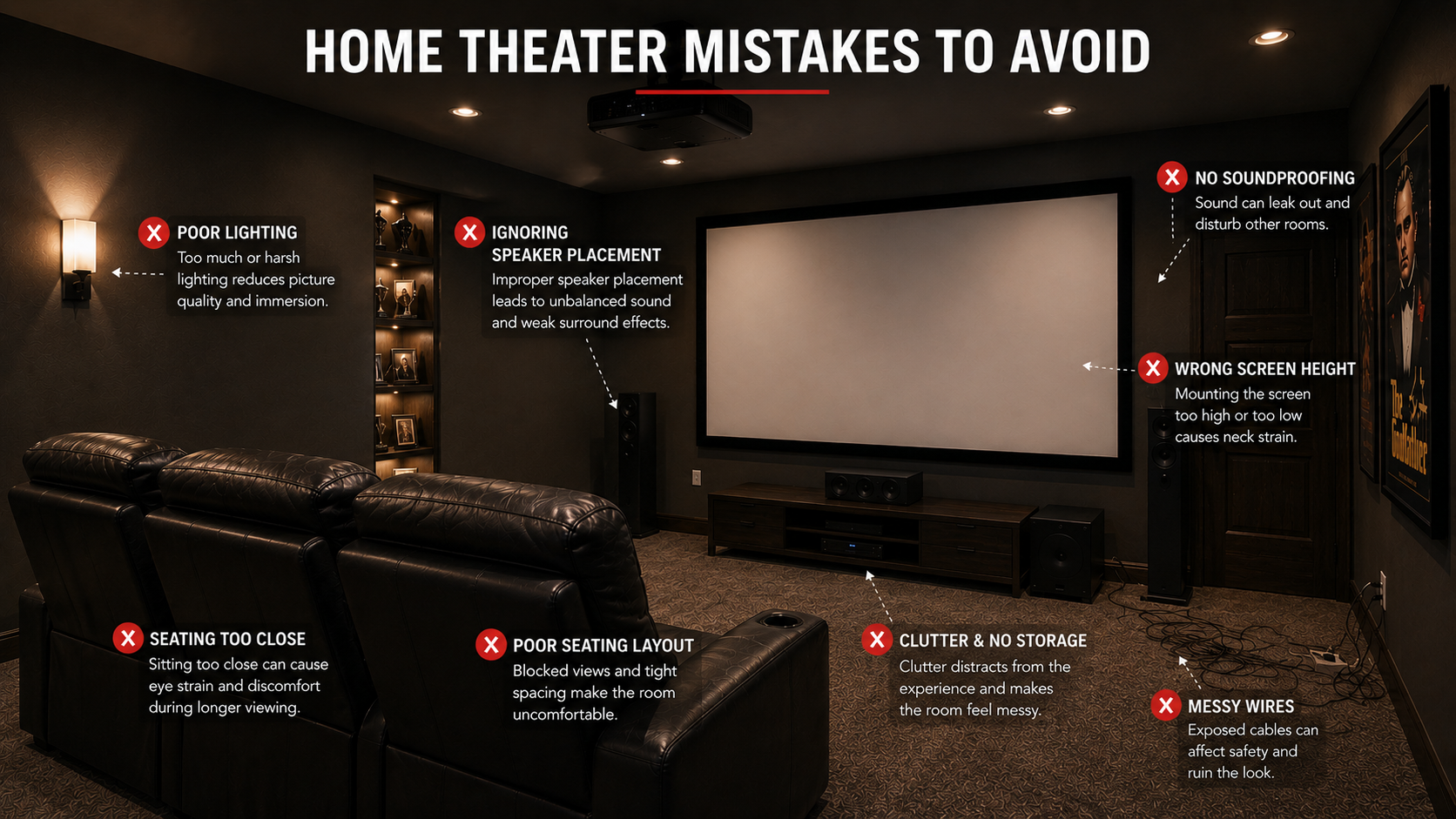
Designing a home theater is exciting. It is easy to imagine the oversized screen, comfortable recliners, immersive sound, and cozy movie nights with family and friends.
But while most people focus on the exciting upgrades, small design mistakes can quietly undermine the entire experience.
A beautiful room does not always make a great theater. Even expensive setups can suffer from poor sound, uncomfortable viewing angles, distracting lighting, or layouts that simply do not work in everyday life.
The good news is that most of these problems can be avoided with thoughtful planning.
Whether you are creating a dedicated theater room or upgrading a family living space, avoiding these common home theater mistakes can help you create a room that feels more immersive, comfortable, and functional from the start.
Affiliate disclosure: This post may contain affiliate links. As an Amazon Associate, I earn from qualifying purchases at no extra cost to you.
Quick Guide: Common Home Theater Mistakes
| Mistake | Why It Causes Problems | Better Approach |
|---|---|---|
| Choosing the wrong screen size | Can cause eye strain, neck discomfort, or a lack of immersion | Match the screen to the room and viewing distance |
| Ignoring speaker placement | Makes dialogue and surround effects feel unbalanced | Plan speaker locations before arranging furniture |
| Forgetting room acoustics | Creates echoes, harsh dialogue, and uneven bass | Add rugs, curtains, panels, and upholstered furniture |
| Overlooking soundproofing | Allows movie sound to travel into other rooms | Address doors, windows, shared walls, and flooring |
| Using too much light | Causes glare and reduces picture contrast | Use dimmable, indirect, and layered lighting |
| Choosing style over comfort | Makes longer movies uncomfortable | Prioritize support, viewing angles, and recline space |
| Planning a poor seating layout | Blocks views and limits walking space | Map the room before purchasing furniture |
| Ignoring organization | Creates clutter and visible cables | Include storage and cable management from the start |
| Forgetting the ceiling | Leaves a major design surface unfinished | Consider dark paint, lighting, or ceiling treatments |
| Buying equipment too early | Can result in oversized or poorly placed components | Plan the room before choosing equipment |
| Copying another theater exactly | May not suit your room or lifestyle | Adapt inspiration to your own needs |
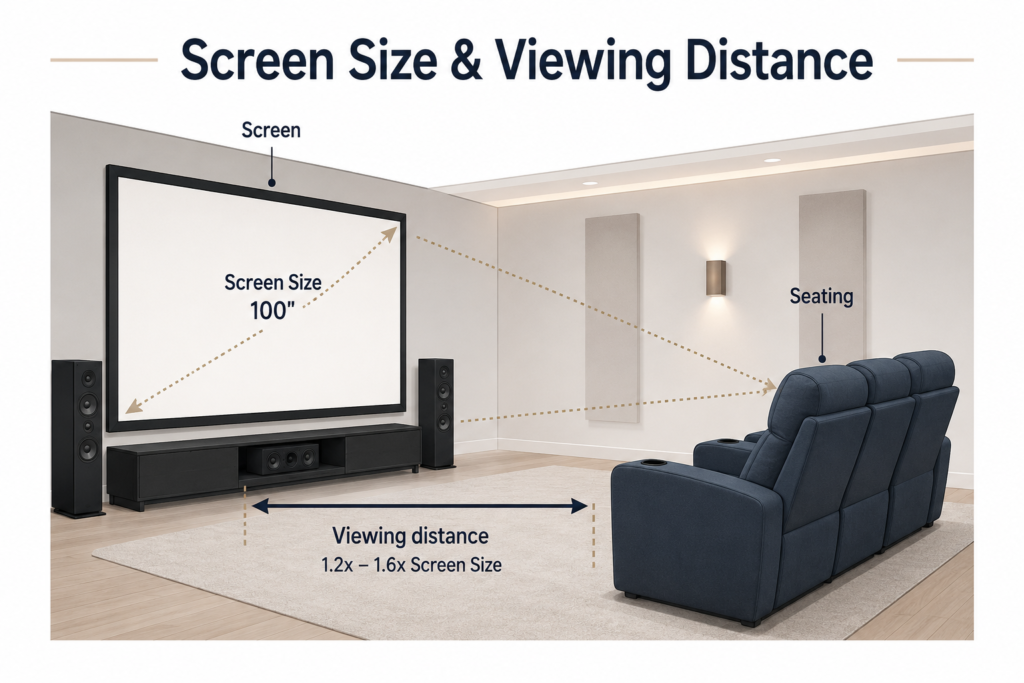
1. Choosing the Wrong Screen Size
One of the biggest misconceptions in home theater design is that bigger always means better.
While a large screen can create a cinematic experience, selecting the wrong size for your room can reduce comfort and enjoyment.
If the screen is too large, viewers may need to constantly move their eyes or turn their heads to follow the action. This can become tiring during longer movies or binge-watching sessions.
A screen that is too small creates the opposite problem. Instead of feeling immersed, the room may feel more like a standard television setup.
Before selecting a screen size, consider:
- Viewing distance
- Room width and height
- Seating layout
- Picture resolution
- Whether you are using a television or projector
As a general rule, the seating should feel naturally positioned without the screen overwhelming viewers.
Another common mistake is mounting a television too high. Many people place screens above fireplaces or decorative features because the arrangement looks attractive, but this often compromises viewing comfort.
Ideally, the center of the screen should be close to seated eye level. Comfort should take precedence over appearance.
For more help planning the distance between your screen and seats, read How to Choose the Perfect Home Theater Seating Layout.
You may also find TV vs. Projector for a Home Theater helpful when deciding which display will work best in your room.
Helpful Amazon Searches for Screens and Mounts
These searches are useful for comparing screen options and mounting solutions for your room.
Home theater projector screens — compare screen sizes and materials
Adjustable TV wall mounts — improve screen height and viewing angles
Laser measuring tools — check viewing distance and wall dimensions
2. Ignoring Speaker Placement
People often spend thousands of dollars on speakers only to place them wherever space is available.
Unfortunately, even premium audio equipment cannot fully overcome poor placement.
Sound is what creates immersion. It allows viewers to feel explosions happening behind them, hear subtle background details, and clearly understand dialogue.
Common speaker-placement mistakes include:
- Pushing front speakers into corners
- Placing surround speakers too far away
- Positioning the center channel incorrectly
- Hiding the subwoofer wherever it happens to fit
- Blocking speakers with furniture
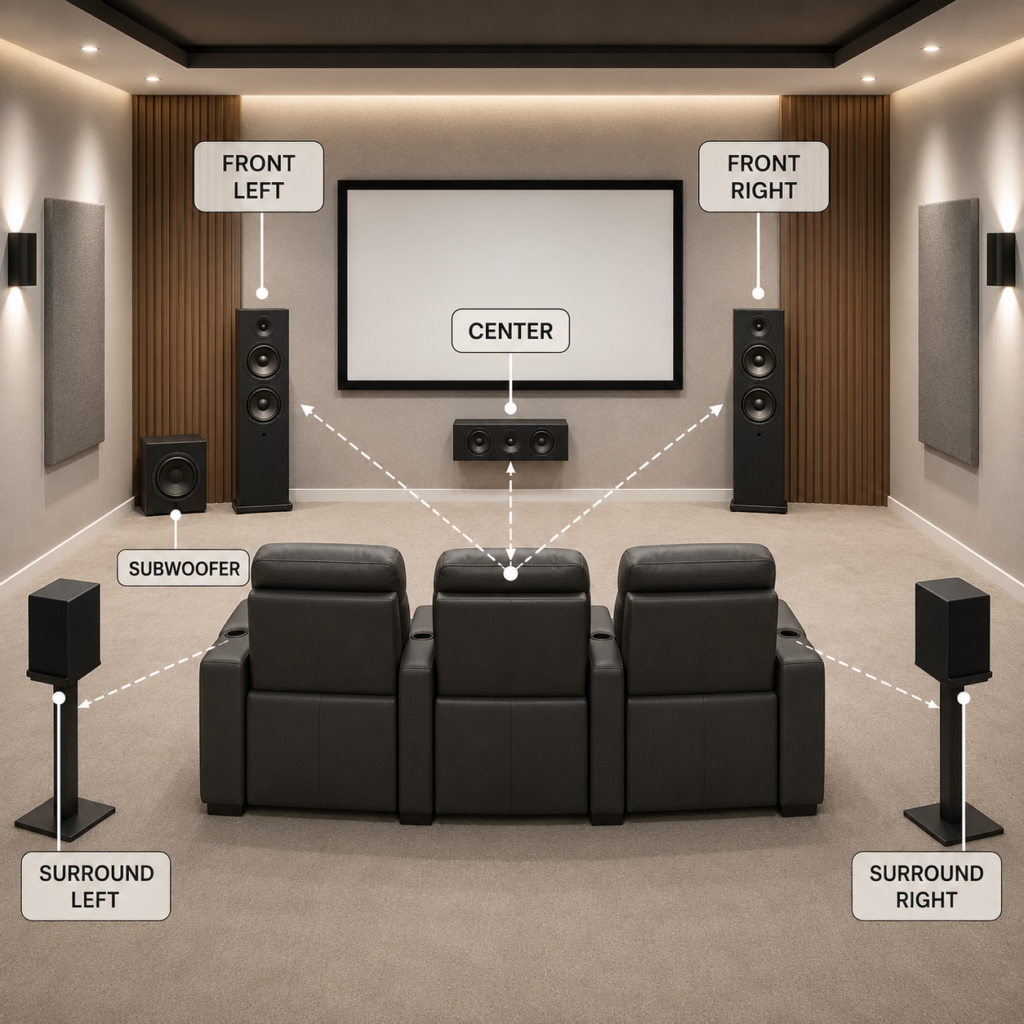
For a more balanced sound experience, the front left and right speakers generally perform best near ear level.
The center speaker should remain aligned with the screen because most movie dialogue is routed through this channel.
Surround speakers usually work best when placed slightly behind the main seating position. In more immersive systems, ceiling speakers can help create overhead effects.
Speaker placement becomes even more important in open-concept living rooms, where sound naturally spreads throughout a larger space.
A modest audio system with proper placement often performs better than expensive equipment positioned incorrectly.
For a more detailed breakdown, read Speaker Placement Tips for a Home Theater vs. a Family Living Room.
You can also explore Best Soundbars for Home Theaters and Media Rooms if a traditional surround-sound system does not fit your room.
Helpful Amazon Searches for Home Theater Sound
These searches are useful when comparing speakers that fit your room and preferred audio setup.
5.1 home theater speaker systems — compare traditional multi-speaker setups
Center-channel speakers — improve dialogue clarity
Speaker stands — position speakers closer to ear level
3. Forgetting About Room Acoustics
Many people assume sound quality depends entirely on the equipment.
In reality, the room itself plays a major role.
Hard surfaces reflect sound. Large, empty spaces can create echoes and make dialogue feel harsh, hollow, or unclear.
A theater with poor acoustics may experience:
- Noticeable echoes
- Hollow-sounding dialogue
- Excessive or uneven bass
- Distracting audio reflections
- Uneven sound distribution
Fortunately, improving room acoustics does not always require a major renovation.
Simple additions can help, including:
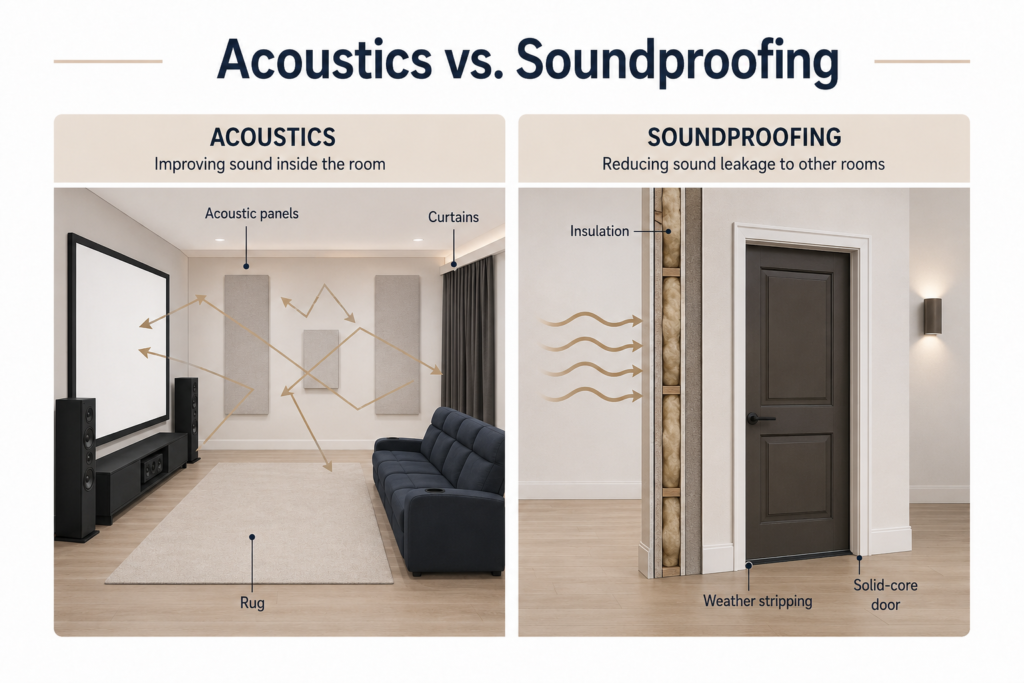
- Acoustic wall panels
- Area rugs
- Heavy curtains
- Upholstered seating
- Decorative wall treatments
- Fabric accents
Even bookshelves, blankets, and other soft furnishings can help reduce sound reflections.
Acoustic improvements are often invisible, but their impact can be enormous.
For a clear explanation of the available options, read Acoustic Panels vs. Soundproofing for Home Theaters.
You may also want to consider how your flooring affects the room. Best Flooring for Home Theater Sound explains how different materials influence both comfort and acoustics.
Helpful Amazon Searches for Room Acoustics
These searches are useful when you want to soften harsh reflections without remodeling the room.
Acoustic wall panels — reduce echoes and add visual interest
Large area rugs — soften rooms with hard flooring
Heavy blackout curtains — control light and reduce reflections
4. Overlooking Soundproofing
Soundproofing and room acoustics are often confused, but they solve different problems.
Acoustic treatments improve how sound behaves in the room. Soundproofing helps control sound traveling outside the room.
Without proper sound management, late-night movies may disturb bedrooms, neighboring rooms, or the rest of the house.
Common sound-leakage points include:
- Doors
- Shared walls
- Windows
- Floors
- Gaps around the ceiling
Helpful improvements may include:
- Weather stripping around doors
- Solid-core doors
- Acoustic curtains
- Wall insulation
- Decorative acoustic panels
- Carpeting or large rugs
You do not need to completely isolate the room to notice an improvement. Even a few small upgrades can make a meaningful difference.
For more ideas, read Soundproofing Techniques for a Home Theater.
Helpful Amazon Searches for Reducing Sound Leakage
These searches are useful when you want to start with simple, budget-friendly sound-control improvements.
Door weather stripping — seal gaps around theater doors
Soundproof curtains — reduce sound and light around windows
Door draft stoppers — close the gap beneath a door

5. Using Too Much Light
Lighting can completely change the home theater experience.
Bright rooms reduce contrast and create glare, making the image appear washed out. Natural light is one of the biggest challenges, especially in living rooms and multipurpose spaces.
Large windows may look beautiful during the day, but they can significantly affect viewing quality.
Consider using:
- Blackout curtains
- Dimmable fixtures
- Wall sconces
- LED accent lighting
- Soft floor-level lighting
- Fiber-optic star ceilings
Layered lighting works especially well because it creates atmosphere while preserving visibility.
Many homeowners also make the mistake of installing bright overhead fixtures directly above the seating. Indirect lighting usually feels softer and more cinematic.
Lighting should support the experience rather than compete with it.
For more inspiration, read How to Layer Lighting in a Home Theater and Top Decorative Lighting Accessories for Home Theaters.
For a more dramatic ceiling feature, visit Creating a Star Ceiling Effect in Your Theater Room.
Helpful Amazon Searches for Theater Lighting
These searches are useful when creating softer, more flexible lighting around the room.
Blackout curtains — control natural light and screen glare
Dimmable wall sconces — create soft, indirect lighting
LED strip lights — add accent lighting behind screens or ceilings
6. Choosing Style Over Comfort
Beautiful theater rooms often appear online with dramatic designs and luxury finishes.
But real home theaters are meant to be used.
Comfort matters.
A stunning chair that becomes uncomfortable after an hour will quickly lose its appeal.
When selecting seating, consider:
- Recline space
- Cushion and lumbar support
- Head and neck positioning
- Armrest spacing
- Viewing angles
- Walking paths
Rows of seating may look impressive but can become difficult to navigate in smaller spaces. Some families may be happier with fewer seats and more room rather than squeezing additional chairs into the layout.
Think about how you actually use the room.
Is it primarily for family movie nights, sports gatherings, gaming, or long binge-watching sessions?
The room should match your lifestyle.
For help choosing comfortable seating, read What to Look for in a Comfortable Home Theater Recliner.
You may also like Home Theater Seating Accessories You Didn’t Know You Needed for simple ways to make existing seats more comfortable and convenient.
Helpful Amazon Searches for Theater Seating
These searches are useful when comparing seating and comfort accessories.
Home theater recliners — compare dedicated theater seating
Recliner tray tables — keep snacks and drinks within reach
Recliner headrest pillows — improve neck support during long movies
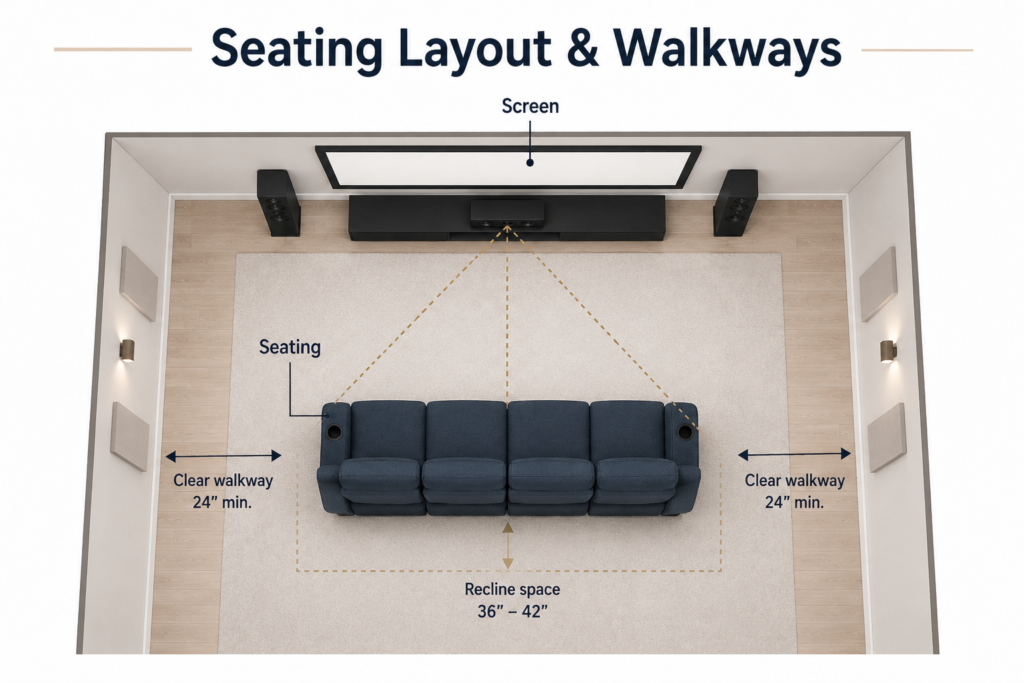
7. Poor Seating Layout and Viewing Angles
Even comfortable seating can fail if the layout is wrong.
Common mistakes include:
- Placing seats too close to the screen
- Positioning seats too far away
- Creating blocked views
- Leaving limited walking space
- Using flat rows in a larger theater
Before purchasing furniture, map out the room.
Allow enough clearance for:
- Recliners to open fully
- Comfortable foot traffic
- Side tables
- Snack stations
- Storage access
Viewing angles become even more important in wider rooms. Everyone should feel connected to the screen without needing to twist, lean, or turn their head for an entire movie.
Good seating placement helps every seat feel like the best seat.
For layout ideas and planning tips, see How to Choose the Perfect Home Theater Seating Layout.
If you are deciding between a dedicated theater and a more flexible family space, my article, Home Theater vs. Living Room: Which Setup Is Better? can help you compare the two approaches.
8. Ignoring Storage and Organization
Clutter can quietly affect how polished and relaxing a home theater feels.
Blankets, remotes, gaming controllers, chargers, snacks, and accessories can quickly take over the room. Without proper storage, even a beautiful theater can feel crowded and disorganized.
Consider adding:
- Built-in shelving
- Floating shelves
- Media consoles
- Hidden-storage ottomans
- Cabinets
- Display shelving for collectibles
Organization improves the movie experience by keeping everything accessible while maintaining a cleaner look.
Do not overlook cable management. Messy wires can detract from a polished theater design and create tripping hazards and safety concerns.
Ways to hide cables include:
- Cable raceways
- Cord covers
- In-wall cable channels
- Built-in cabinetry
- Wire-management sleeves
The goal is to create a space that feels organized, relaxing, and immersive rather than cluttered.
For more storage and cable ideas, read How to Organize a Home Theater and Hidden Cable Management Ideas for a Clean Home Theater.
Helpful Amazon Searches for Theater Organization
These searches are useful for concealing cables and creating accessible storage.
Cable raceways — hide wires along walls and baseboards
Floor cord covers — protect cables that cross the floor
Media consoles — organize equipment and accessories
Storage ottomans — store blankets, remotes, and small items
9. Forgetting the Ceiling Design
Walls often receive most of the attention in a home theater while the ceiling is left plain and unfinished.
However, the ceiling is one of the largest visual surfaces in the room and can have a major impact on the overall atmosphere.
Popular ceiling upgrades include:
- Fiber-optic star ceilings
- Tray ceilings
- Wood-beam accents
- Acoustic ceiling treatments
- LED perimeter lighting
- Dark paint finishes
Star ceilings remain especially popular because they create ambiance without overwhelming the room.
Even a simple ceiling upgrade can transform the space, making the theater feel more intentional and complete.
Look up—you may be overlooking one of the room’s biggest design opportunities.
For ceiling inspiration, read Creating a Star Ceiling Effect in Your Theater Room.
You can also explore Home Theater Paint Colors for ideas that help reduce reflections and create a more cinematic atmosphere throughout the room.
Helpful Amazon Searches for Ceiling Features
These searches are useful when comparing decorative lighting for a theater ceiling.
Fiber-optic star ceiling kits — create a dramatic starry-sky effect
Dimmable LED strip lights — add tray-ceiling and perimeter lighting
LED channels with diffusers — create a smoother, finished lighting effect
10. Buying Equipment Before Planning the Room
This is one of the most common home theater mistakes.
Many homeowners purchase equipment first and plan the room later.
The result often includes:
- Oversized screens that overwhelm the room
- Recliners that leave no walking space
- Poor viewing angles
- Speakers that do not fit properly
- Limited room for storage or accessories
Instead, begin with the room layout.
Plan for:
- Room dimensions
- Viewing distance
- Seating placement
- Traffic flow
- Lighting needs
- Storage requirements
- Speaker locations
Once the layout is established, choose equipment that fits the space.
Planning first often saves money and creates a more comfortable final result. The room should guide the technology, not the other way around.
If you are still planning your room, Home Theater Accessories and Decor can help you think through the details before you begin purchasing equipment.
You may also want to read Top 5 Must-Have Home Theater Accessories for Better Movie Nights before deciding which additions are genuinely useful.
11. Trying to Copy Someone Else’s Theater Exactly
Social media and design websites provide endless inspiration, but copying another home theater exactly does not always work.
Every room is different, and every family is different.
What works in a large, dedicated basement theater may not work in a family living room or multipurpose space.
Instead, design around:
- Your room size
- Your budget
- Your viewing habits
- Your family’s needs
- Your personal style
Luxury does not always mean bigger.
Small theaters can still feel elegant, immersive, and highly functional when they are intentionally designed.
The best home theater is not the one that looks perfect online. It is the one your family genuinely enjoys using.
For more style inspiration, visit Home Theater Wall Decor Ideas and Home Theater Paint Colors.
You may also enjoy 10 Movie Theater Themes to Inspire Your Dream Home Cinema for ideas you can adapt to your own room rather than copying exactly.
If movie nights regularly include snacks and guests, DIY Snack Stations for Home Theaters can help you create a practical space for entertaining.
More Helpful Home Theater Guides
Continue planning your space with these related Home Cinema Living guides:
- Home Theater Ventilation and Temperature Control — keep the room comfortable when equipment and guests generate heat
- How to Organize a Home Theater — organize cables, seating, storage, and movie-night essentials
- Home Theater Paint Colors — choose colors that create atmosphere and reduce distracting reflections
- How to Layer Lighting in a Home Theater — combine practical lighting with cinematic ambiance
- Speaker Placement Tips for a Home Theater vs. a Family Living Room — adapt your audio layout to the type of room you have
- Acoustic Panels vs. Soundproofing for Home Theaters — understand which solution addresses your specific sound problem.
- Hidden Cable Management Ideas for a Clean Home Theater — conceal wires for a safer, more polished room
- Home Theater Popcorn Bar Ideas — add a fun and functional snack area to complete the experience
Frequently Asked Questions
What is the most common home theater mistake?
One of the most common mistakes is buying equipment before planning the room. Screen size, seating distance, speaker placement, lighting, and walking space should all be considered before purchasing large or expensive components.
How far should home theater seating be from the screen?
The ideal viewing distance depends on the screen size, resolution, and personal comfort. Seating should be close enough to feel immersive without requiring viewers to move their heads or strain their eyes to follow the action.
Should a home theater screen be at eye level?
The center of the screen should generally be close to seated eye level. Mounting a television or screen too high can cause neck discomfort, especially during longer movies.
Where should home theater speakers be placed?
The front left and right speakers should usually be positioned near ear level, while the center speaker should remain aligned with the screen. Surround speakers generally work best beside or slightly behind the main seating area.
Do acoustic panels soundproof a home theater?
No. Acoustic panels reduce echoes and improve sound quality inside the room, but they do not fully prevent sound from traveling into other areas of the home. Soundproofing requires addressing walls, doors, windows, floors, and other sound-leakage points.
What type of lighting is best for a home theater?
Dimmable, indirect lighting is usually best. Wall sconces, floor-level lights, LED accent lighting, and blackout curtains can create atmosphere without causing distracting reflections or reducing picture contrast.
What color should home theater walls be?
Dark, low-reflective colors such as charcoal, deep navy, matte black, or dark brown generally work well because they help reduce screen glare and create a more immersive atmosphere.
How can I make my home theater more comfortable?
Choose supportive seating, leave enough room for recliners to open, maintain comfortable viewing angles, control the room temperature, and keep blankets, drinks, remotes, and snacks within easy reach.
Is a larger screen always better for a home theater?
No. A screen that is too large for the room can cause eye strain and uncomfortable viewing, while one that is too small may not feel immersive. The best screen size is one that fits the room and seating distance.
Should I hire a professional to design my home theater?
A professional may be helpful for complex soundproofing, electrical work, built-in wiring, advanced audio systems, or major renovations. Many simpler improvements, such as lighting, storage, acoustic treatments, and furniture placement, can be planned without professional installation.
Final Thoughts
A great home theater is about more than equipment.
The most memorable spaces combine:
- Comfort
- Lighting
- Sound
- Design
- Functionality
Avoiding these common home theater mistakes can help you create a room that feels thoughtful rather than improvised.
Take time to plan. Prioritize comfort. Pay attention to sound. Create an atmosphere that suits your room and how your family enjoys spending time together.
At the end of the day, a home theater is not just a room.
It is an experience.

Lisa is the creator of Home Cinema Living. Together with her husband, a longtime home theater professional, she has spent years designing and enjoying home theater spaces that bring family and friends together for memorable movie nights.
What do you think is the most overlooked part of a home theater setup today: sound, lighting, or seating layout? I’ve seen people spend a ton on giant TVs and speakers, then place the couch way too close or leave bright lights on everywhere. The point about mounting TVs too high is real too. A lot of setups look nice but probably hurt your neck after one movie. Do you think smaller rooms are actually easier to make feel cinematic because you can control the sound and lighting better?
You bring up a great point because people often focus on the big purchases first and overlook the details that most affect the experience. For me, the seating layout is one of the most overlooked parts. You can have great sound and a large screen, but if the seating distance or viewing angle is off, it changes everything. I also agree about TVs being mounted too high. It may look nice aesthetically, but comfort matters during longer movie sessions. Smaller rooms can definitely have an advantage too because they are often easier to control for sound, lighting, and immersion. That said, I think if a room is planned out correctly, almost any size room can create an amazing home theater experience.
This is the most complete and honest home theater guide I’ve come across, and I wish I had read it before making several of these exact mistakes myself.
We bought an 85-inch television before properly measuring our viewing distance, and the first movie night made everyone’s necks ache from the sheer size of it in our medium-sized room. Lesson learned the hard way.
The acoustics section genuinely surprised me. I always assumed our echo problem was just a speaker quality issue, but after adding a large area rug and heavy curtains, the difference was immediately noticeable without changing a single piece of equipment.
The point about copying someone else’s theater exactly is so important and rarely discussed. Inspiration is useful, but context is everything.
One thing I’d love to see covered is ventilation and temperature control; our room gets warm quickly when equipment is running, and people are seated. Has anyone found good solutions for that?
Bookmarking this page for our next upgrade phase!
Thank you so much for sharing this. It sounds like you learned a few of the same lessons many people run into, especially with screen size and viewing distance. Bigger definitely is not always better if the room dimensions are working against you!
I’m also glad the acoustics section resonated with you. It’s amazing how much of a difference simple additions like rugs and curtains can make before upgrading equipment. Room treatments are often overlooked, but they can completely change the experience.
You also brought up a great point about ventilation and temperature control, which are rarely discussed. Equipment, people, and enclosed spaces can heat up surprisingly fast. Good airflow, quiet ventilation fans, dedicated HVAC returns, ceiling fans, or even mini-split systems can make a huge difference depending on the room size and setup.
I may have to cover this in a future post because comfort is just as important as the screen and sound! Out of curiosity, is your theater a dedicated room or more of a living room/multi-purpose setup?
You have thought of everything and we already have made the mistake of buying a screen that is too large for the room. You are right, it is not comfortable to watch as you need to keep turning your head. My husband won’t admit it though.
The other thing we need to do is remove the clutter. There are way to many ornaments hanging around and your eye does get distracted easily. Now I need to show my husband this article so that he believes me.
We have an open plan lounge, and you can hear the noise from the TV from the other side of the house. In this case what would you suggest to drown out sound?
Thank you for sharing your experience! We made a similar mistake with screen size at one point, and it’s amazing how much viewing comfort matters once you start paying attention to it. I had to laugh at your husband’s reaction because sometimes seeing it in writing from someone else helps make the point! I completely agree about clutter, too; it’s surprising how much it can pull your attention away from the screen. For your open-plan lounge, have you considered adding rugs, curtains, or even acoustic wall panels to help absorb sound and reduce echo? Those solutions can make a noticeable difference without requiring a major renovation. Let me know if that helps.
Thank you for your thoughtful feedback. You’ve highlighted an important point while technology and equipment are essential, the overall movie experience depends just as much on comfort, sound quality, lighting, and room design. I’m glad the article helped reinforce the value of careful planning, as avoiding these common mistakes can make a significant difference in creating a truly immersive and enjoyable home theater.
Thank you for your kind comment. I appreciate you taking the time to read the article and share your insights. Your feedback is greatly valued!